
For most organizations, Microsoft 365 is the foundation of daily business operations. Email, file sharing, collaboration, and communication all depend on it. What many business leaders don’t realize, however, is that Microsoft 365 is not fully secure by default.
While Microsoft provides powerful tools, protecting user accounts requires ongoing configuration, monitoring, and adaptation to new threats. Today, one of the most common and costly risks facing organizations is account takeover fraud. This occurs when attackers gain access to legitimate user accounts and use that trust against the business.
Why account takeover fraud is rising in Microsoft 365
Cybercriminals no longer rely on crude phishing emails or guessing passwords. Instead, they target people, not systems, using increasingly sophisticated tactics.
Some of the most common methods include:
- AI-generated phishing emails that are highly realistic and convincing
- MFA fatigue from repeated MFA prompts designed to wear users down
- Malicious links that capture credentials or authentication sessions
- Fake app permissions that quietly grant attackers ongoing access
In many cases, attackers don’t need to “break” security. They simply wait for a user to click, approve, or trust the wrong thing.
Why MFA alone isn’t enough
Multi-factor authentication (MFA) is one of the most important protections in Microsoft 365, and it should be enabled for every user. However, simply turning MFA on is no longer enough on its own.
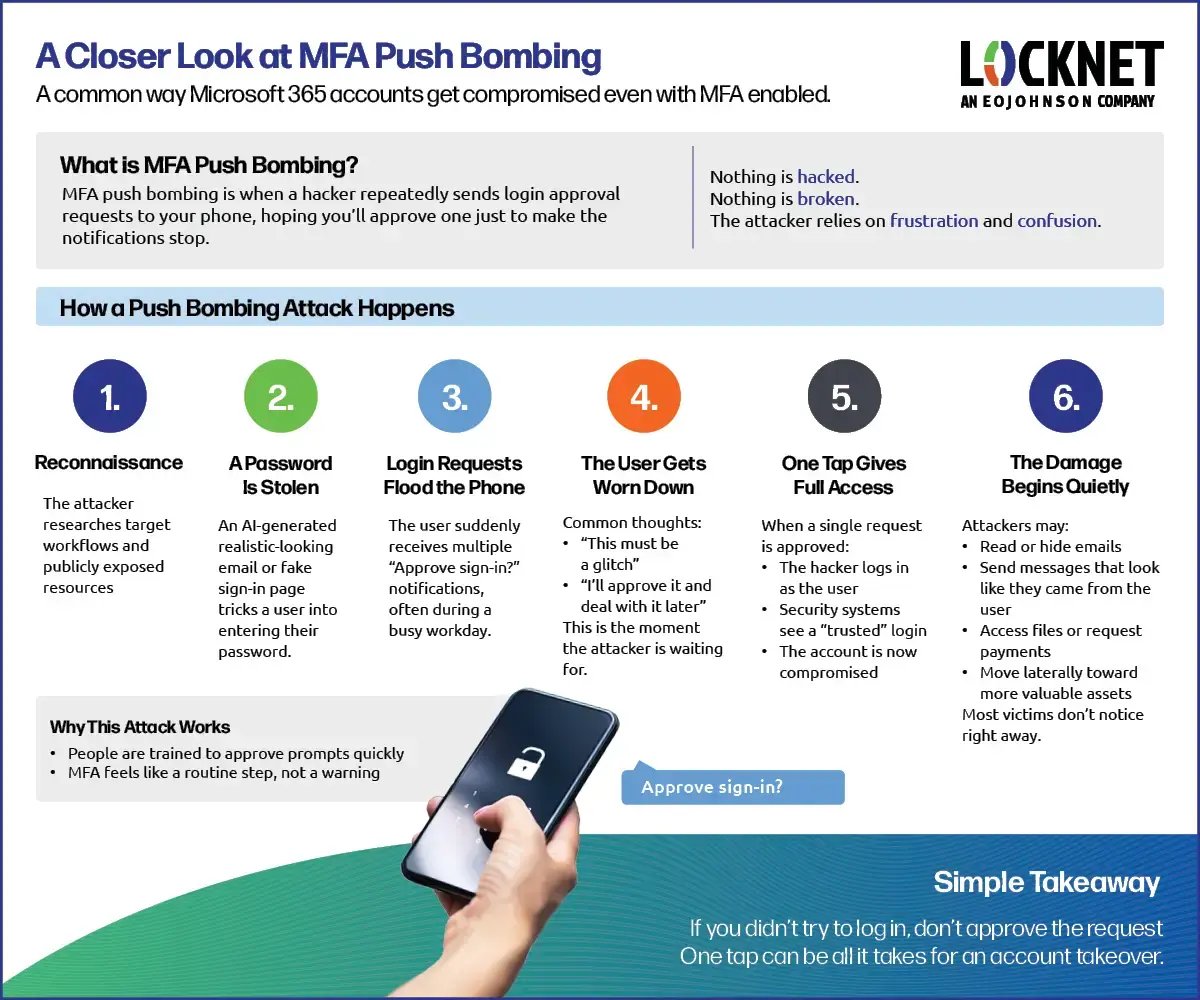
Attackers have shifted their focus away from breaking technology and toward manipulating people. Instead of trying to defeat MFA, they look for ways to work around it by creating confusion, urgency, or fatigue. One of the most common examples of this is a technique known as MFA push bombing.
Here’s a simple look at how this type of attack works in real life.
What happens after an account is compromised
Once an attacker gains access to a Microsoft 365 account, the real risk begins. Because the activity comes from a legitimate user account, it often looks normal at first and can go unnoticed.
This is how many account takeovers turn into larger business problems. Attackers may quietly read emails, hide important messages, or send convincing requests that appear to come from trusted employees. By the time something feels “off,” the damage may already be done.
This is why protecting Microsoft 365 users isn’t just about turning on security features — it’s about ensuring those protections are properly configured, monitored, and adapted as threats evolve.
A smarter approach to M365 security
Effective protection against account takeover fraud requires a layered, proactive approach that focuses on both technology and behavior.
This includes:
- Properly enforced MFA using modern methods like number matching or security keys
- Conditional access rules that adapt to risk, location, and device health
- Ongoing monitoring for unusual login patterns and account behavior
- Strong email security to stop credential-harvesting attacks before users interact
Just as important, these controls must be reviewed, updated, and monitored continuously.
Why ongoing management of M365 matters
Threats targeting Microsoft 365 users are constantly changing. Attackers adjust their techniques faster than static configurations can keep up.
That’s why many organizations are moving toward managed Microsoft 365 security as part of their broader IT strategy. The goal isn’t complexity — it’s consistency, visibility, and peace of mind.
When user security is actively managed:
- Risky changes are detected early
- Misconfigurations don’t linger unnoticed
- Users are protected without disrupting productivity
- Businesses stay resilient as threats evolve
Locknet Inforcer reduces risk through consistent Microsoft 365 security standards
One of the biggest reasons account takeover fraud succeeds isn’t a lack of tools - it’s inconsistency.
Over time, Microsoft 365 environments change. New users are added, settings are modified, and security policies drift from best practices. Even small changes can quietly reintroduce risk, especially around MFA, email security, and access controls.
That’s why at Locknet, we take a standards-based approach to Microsoft 365 security.
Rather than relying on one-time configuration or manual spot checks, we evaluate each tenant against a defined “gold standard” for Microsoft 365 security. This baseline reflects modern best practices for protecting user accounts, reducing phishing risk, and limiting the impact of compromised credentials.
Using Locknet Inforcer, we’re able to:
- Continuously evaluate tenant security configurations
- Identify gaps that increase the risk of account takeover
- Apply consistent security standards across all clients
- Provide clear, easy-to-understand reports showing where improvements are needed
This approach allows us to reduce risk proactively, rather than reacting after an account has already been compromised.
Final thoughts on M365 security
Account takeover fraud is no longer a rare or highly technical problem. It’s a common business risk driven by trust, user behavior, and increasingly sophisticated social engineering.
Microsoft 365 provides a strong foundation, but real security comes from how it’s configured, monitored, and maintained over time. Organizations that treat user account security as an ongoing responsibility, instead of merely a checkbox, are far better positioned to prevent breaches before they impact operations.
Ready to protect your business? Don’t leave Microsoft 365 security to chance. Partner with Locknet for managed IT services that deliver consistent protection, expert monitoring, and peace of mind. Contact us to learn how our comprehensive managed IT services which include Locknet Inforcer Microsoft 365 security can keep you one step ahead of evolving threats.